Two weeks ago, I decided to change the operating system on my gaming laptop from Windows 11 to Linux. Here’s what I did, the problems I encountered, and what I eventually settled on.
Why the change.
Why change to Linux from a very stable Windows 11 installation? Well I don’t like the direction Microsoft is taking Windows. Here are the reasons why.
- AI. Microsoft is adding a lot of AI to Windows, like Windows Recall and Co-Pilot, which I don’t want on my system.
- Telemetry. While there are hacks to turn off the mandatory telemetry that Microsoft wants to collect, I don’t like it. My computer is my property, and no one should be collecting information from it without my permission.
- Microsoft Account. While I know it’s possible to set up Windows without a Microsoft account, you still have to use a hack. I don’t trust Microsoft at all to keep my data secure. Before anyone mentions Apple, of which I’m a user, it’s not mandatory to use an Apple account to set up a Mac. I trust Apple much more than Microsoft to protect my data. For example, I have an Apple One account and use iCloud a lot. I also have 30GB of OneDrive space (15GB free for life with Windows Phone when that was a thing), but I don’t use OneDrive at all.
- Bloatware. Windows is stuffed full of bloatware, some like the Xbox and the phone app that you can’t uninstall without hacks.
- Security. Security-wise, I would argue that Linux as a whole is more secure than Windows. Perhaps this is because it has a smaller market share on the desktop only (after all, Android, which is the most popular OS globally, including all devices, is based on Linux). Additionally, Linux is based on Unix, which was originally designed for large businesses and servers. Linux is generally considered more secure for those reasons.
Hardware
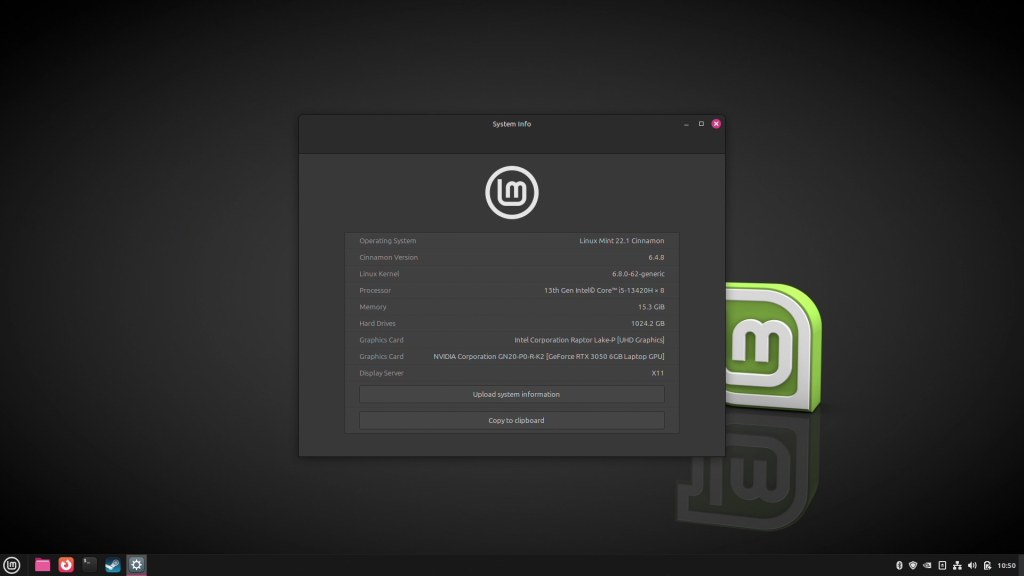
So what hardware am I installing Linux on. Well it is my Acer Nitro V15-51 Gaming laptop which has the following specs:
- Intel Core i5 1340H 8 Core 12 Thread CPU
- Intel UHD Graphics
- Nvidia GeForce RTX 3050 Mobile GPU with 6Gb Graphics
- 15.6” 1080p 165Mhz IPS Screen
- 16Gb DDR5 5200Mhz Ram (2x8GB)
- 2 x 512Gb NVME SSD
- WiFi 6/Bluetooth 5.2
The only thing this setup has to do is gaming. I’ve connected it to an Elgato Neo Capture Card and an external 1080p monitor with a Bluetooth keyboard and mouse. While I do stream on Twitch, my Mac mini M4 handles all other tasks, including streaming. Also, I’m only interested in 1080p/60FPS gaming because my external monitor supports 1080p/75Mhz only.
What problems did I have?
Most of the problems I have are linked to having a Nvidia graphic card in my laptop. Linux is currently changing display servers, moving from the old, and less secure X.Org display system to the new Wayland display system.
Nvidia’s drivers for Linux are also changing, moving from a closed-source to a more open-source nature.
Unfortunately, the current closed-sourced Nvidia drivers for Linux don’t seem to support Wayland very well. The last closed-source drivers are 550, while the new, more open-source drivers are 570/575, while support wayland a lot better, still need more work for gaming.
I also had problems with some Linux Distros with the fact that my laptop has 2 graphic cards in it, the Intel one and the Nvidia one and the external monitor that I have attached.
Distros I tried
Distributions (Distros) are essentially different versions of Linux that companies create and support. While they primarily utilise the same software stack, they customise it in various ways.
There are also different package managers between distros. Package managers are the way Linux installs software, similar to Steam or the Windows Store. The main ones are APT (based on Debian), RPM (based on Red Hat Linux), Snap (made by Canonical), and Flatpack, which can be supported on most Linux distros.
Personally, I’m used to APT because I’ve been using Debian-based Linux systems on and off since 1996. It is also the package manager I use on my 2 servers. I’m not an expert on Linux, but I know more than the average person.
I also don’t want to mess around with administering and troubleshooting the install once it’s set up. However things do go wrong from time to time so a good community and documentation on the web is essential.
I tried the following distributions.
- Tuxedo Linux. This is made by Tuxedo Computers, a company that makes and sells computers with Linux pre-installed. It is based in Germany.
- POP_OS. This is made by System 76, a company that makes and sells computers with Linux pre-installed. This one is based in the US.
- Fedora. The free version of Red Hat Linux, the enterprise Linux System that is used in Big Business and a lot of Servers. This distro is usually bleeding edge. Red Hat is based in the US.
- Ubuntu. This is the second Linux system I ever used after Debian. I don’t like the way it is heading with its snap package manager as it seems to be slower than the rest. This distro is made by Canonical that is based in the UK.
- Linux Mint. I have used this distro for years. It runs on the X.Org Display Manager and is very noob friendly but you can not customise it as much as other distro’s. It is made by volunteers mainly based in Europe.
- Bazzite. This is a gaming Linux distro comes with a lot of tweaks and pre-installed patches/drivers already installed along with Steam, Heretic Launcher and so on for gamers. It is based off Fedora and is a community made distro that has contributors from all over the world.
What did I settle on?
The only 2 distro’s that worked properly with my setup was Linux Mint and Bazzite. The other distro’s all had graphical problems from no signal on the external monitor to the Nvidia graphic card not working properly or at all in games.
I decided to go with Linux Mint as Bazzite uses the RPM Package Manager and I am not very familiar with it along with the Nvidia driver problems with the wayland display manager/game performance.
Linux Mint uses the X.Org Display Manager, which works better with the RTX 3050 in my laptop and is fully supported with X.Org. This makes it easy to get the external monitor to work. I’ve been using the distro on my desktop on and off for years, and I’ve never had any issues with any updates.
I’m using the 550 driver for my Nvidia graphics card. When I tried the 570 on Linux Mint & 575 driver on Bazzite, it reduced the frame rate from about 55-60 FPS to 25-30 FPS while playing my main game, Game of Thrones: Kingsroad, with lower settings compared to the 550 drivers.
Thanks to Valve’s Proton, 90% of the games I play are supported on Linux. The only two that I play but aren’t supported are Wuthering Waves, which is supported on Mac and iOS/iPad OS, and Genshin Impact, which is supported on iOS/iPad OS. Since I don’t really play those games anymore, I’m very happy using Linux as my main gaming OS.
I don’t play games like Fortnite, Apex Legends and CoD:Warzone at all, and those game are NOT supported on Linux due to the anti-cheat software they use.
Here are the list of games I have installed and working on the laptop, all running at 1080p/60 with at least normal settings when the power profile is set to gaming.
- Game Of Thrones: Kingsroad
- Vega Conflict
- Vampire Survivors
- World Of Warships
- Command & Conqure Generals
- Command & Conqure Generals:Zero Hour
- Control Ultimate Edition
- Crysis
- Crysis Warhead
- Crysis Wars
- Crysis 2 Maximum Edition
- Black Mesa – Definitive Edition
- HyperBowl
- Tomb Raider
- Rise of the Tomb Raider
- Shadow of the Tomb Raider
- Star Wars:Empire Strikes Back – Gold Edition
- Stray
- Supreme Commander 2
- Warhammer 40,000: Dawn Of War – Dark Crusade
The only tinkering I had to do is install an application called ProtonUp-Qt so I could install GE-Proton10-4 to get some of the games to work properly. This took me about 10 minutes. While there are other ways to install GE-Proton this is the easiest way I found.
What has it been like
So far, I have had no crashes with the system at all. The performance on Linux compared to Windows is a lot better in games. For instance, in GoT:Kingsroad for example, on normal settings, the frame rate on Windows would be between 50-60fps. On Linux, it’s a 55-65fps with the exact same settings. Control again was between 50-60fps on Windows but a solid 60fps on Linux.
While X.Org will be replaced by Wayland in the next few years (Linux Mint are currently testing it with version 22.1 along with future versions. They have hinted they will make the switch by 2028), by time it happens I hope the Nvidia drivers for wayland would have improved a lot. It is still early days for the open-source drivers, the first version is 570 and they are making rapid progress with them.
Conclusion
I am really happy with the system, it means I am no longer bound by what Microsoft wants me to use. I have one system that currently runs Windows 10 for old programs that I paid for and still use on it. That can be offline when Windows 10 losses support later on this year (or could be Oct 2026 as Microsoft just last week announced you can extend the support for free if you use Windows Backup or have 1000 Microsoft Points) as the programs don’t need the internet to work.
For all my office/admin work I use either my iPad 10th Gen, my iPad Pro M4 (Currently typing this out on it) or my Mac mini M4.
If something does goes wrong with my Apple computers then I could use this system for all my office work as I use Nextcloud on my own server as a backup for my iCloud account and Nextcloud works perfectly with Linux.
Libre Office, which comes with Linux Mint, can replace the iWork Suite and is 100% compatible with Nextcloud (Nextcloud Office uses Collabora Office, which is based off the code base of Libre Office). For my radio show all I need is Audacity and FileZilla, which again is available for Linux.
The only program that is not available for Linux that I use all the time is iA Writer, which is my preferred Markdown editor of choice. There are, however, plenty of Markdown editors available for Linux and Nextcloud itself can act as one (Nextcloud Notes uses markdown).
















Leave a reply to Kira Herdman Cancel reply