I currently use two iPads, a MacBook Air, a Mac Mini, and a Windows gaming laptop for my computing and gaming needs.
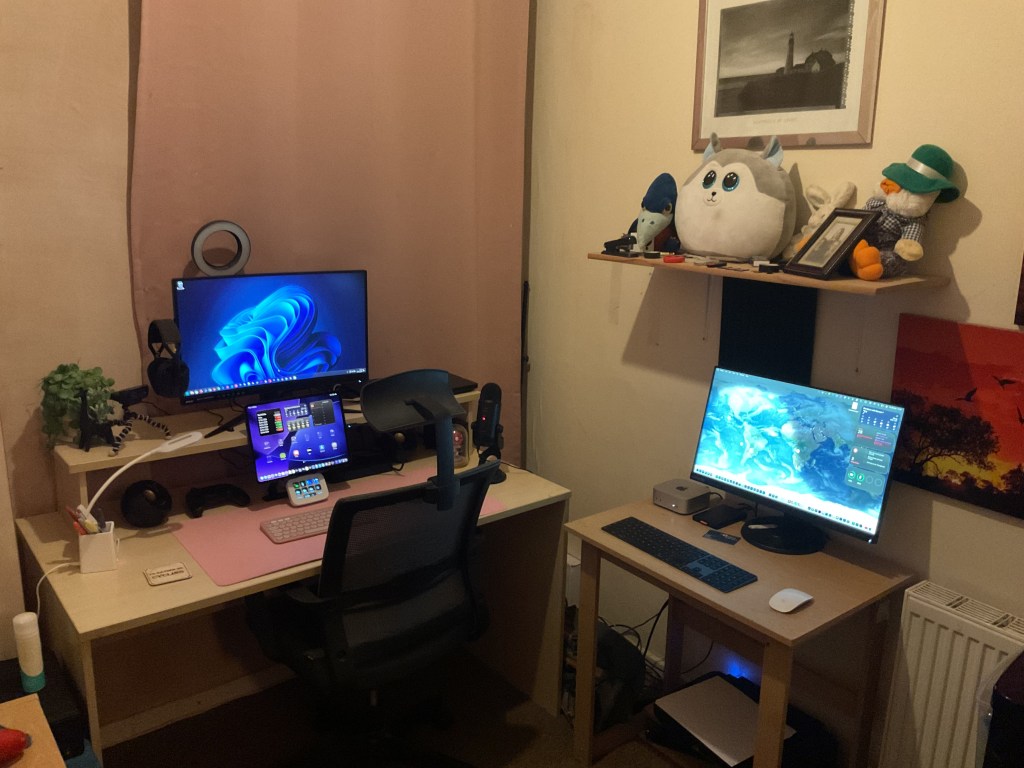
Mac mini M4 – Main Office Mac
I use the Mac mini M4 as my main computer. It’s my go-to for most office tasks, including script writing (iWriter Pro), general word processing (Pages), my book that is just a passion project (Author), spreadsheets (Numbers), note-taking (Apple Notes), web browsing (Safari), RSS news (Lire), and diary entries (Day One) and server admin.
I occasionally check blog posts on here when I’m in the office with iA Writer and/or Typora.
I also record the radio shows for TransRadio UK and edit them on the Mac mini M4.
iPad Pro M4 – Office Tablet Computer
I use the iPad Pro M4 as my main tablet computer in the office. I mainly use it when I want to write without distractions and monitor my streams on Twitch. I also use the iPad to read scripts while recording shows for TransRadio UK.
The main writing apps I use on both iPad’s are iA Writer, Author and iWriter Pro.
Additionally, I can play casual games like Wuthering Waves, Vampire Survivors, Game of Thrones: Kingsroad, and Vega Conflict on this iPad Pro.
iPad 10th Gen – General Use Tablet
I use this tablet to read the news (Ground News) and ebooks. When I’m not in my office, I also use this iPad to check up on Vega Conflict and sometimes social media.
I also have an ESR bluetooth Keyboard case that I use when I am away from home and not have my MacBook Air with me, so this iPad becomes my backup laptop.
Acer Nitro V15-51 – Gaming Laptop
This is my main computer for gaming and streaming.
This laptop is always in my office.
It is currently running Windows 11 Home.
MacBook Air M1 – General Use Laptop
This is my main laptop. I have Steam installed on it, so I can stream games from my gaming laptop that will be in the office upstairs.
It’s also my main writing machine, so all my blog posts are written on this laptop using iA Writer and/or Typora. For other writing needs I use a program called Author.
I use it for general use as well when not in the office.
Windows Office PC – Lenovo V520S Desktop PC
This is a very basic PC that serves as my backup Windows Office PC. When support for Windows 10 ends, it will be disconnected from the internet because the programs I use don’t require it. It’s not currently set up.
It is currently running Windows 10 Pro.
MacBook Pro 2017 – Backup Office Laptop
This is my old Intel-based MacBook Pro. My MacBook Air M1 has replaced it as my main laptop.
Local Storage
My NAS is a TrueNAS Server built from an old PC I received as a gift. I’ve also installed some WD RED HDDs on it.
The TrueNAS Server houses all the data for my Plex Server, Software/General archive, and Nextcloud Backup. It’s also configured to serve as a Time Machine target for my MacBook Pro.
I also have a £129 Mini PC that I use as an App server, so my NAS isn’t facing the internet. It runs Proxmox with a Virtual Machine that has Ubuntu Server installed. Docker is used for Nextcloud Server, Plex Server (reading data off the TrueNAS Server), and a VPN Server that I use when I’m in a coffee shop with my iPad, MacBook Air or iPhone.
Online Storage
For online storage, I use iCloud for all my office work and contacts/calendar.
I manually back up the iCloud Drive onto Nextcloud, usually after making changes to the data on it. This backup also syncs to all my computing devices.
The Nextcloud Server automatically backs itself up to the NAS every night.
Photos taken on my iPhone are automatically uploaded to both iCloud and my Nextcloud Server.
I use FreeFileSync as my backup program. It’s available for both Windows and macOS, and you only need to donate once to get a licensed version for both operating systems. This program is my go-to for backing up my iCloud drive to Nextcloud, the data drive on my NAS to a 1TB USB drive, and the Plex data to a 2TB USB drive, all connected to my Mac mini M4.
Here are the full specifications of what I use to perform these tasks:
Main Computer – Apple Mac mini M4
- Apple M4 10 CPU 10 GPU cores
- 16Gb Unified Ram
- 256Gb SSD
- Logitech K380s Bluetooth Keyboard
- Logitech M350s Bluetooth Mouse
- 250Gb SATA SSD in a UGreen USB-C Case (Time Machine)
- HP Thunderbolt 3 Dock
- 1Tb External USB3 HDD (Backup of Data Archive)
- 2Tb External USB3 HDD (Backup of Plex Data)
- Canon Pixima MG2550S Printer/Scanner
- Blue Yeti USB Microphone
- Lenovo D24-40 24″ 1080p 75Hz Monitor
- macOS Tahoe
Main Tablet Computer – Apple iPad Pro 13” M4 256Gb
- Apple M4 10 CPU 9 GPU cores
- 8Gb Unified Ram
- 256Gb SSD
- Dell Thunderbolt 3 Dock
- Logitech K380s Bluetooth Keyboard
- Logitech M350s Bluetooth Mouse
- iPad OS 26
Main Laptop – Apple MacBook Air M1
- Apple M1 8 CPU 7 GPU cores
- 8Gb Unified RAM
- 256Gb SSD
- 13.3″ 2560×1600 IPS Screen
- WiFi 6/Bluetooth 5
- macOS Tahoe
General Use Tablet Computer – Apple iPad 10th Gen
- Apple A14 Bionic 6 CPU 4 GPU cores
- 4 Gb Unified Ram
- 64GB SSD
- ESR Keyboard Case
- iPad OS 26
Gaming Laptop – Acer Nitro V15-51 Gaming Laptop
- Intel Core i5 13420H 8 Core 12 Thread CPU
- Intel UHD Graphics
- Nvidia GeForce RTX 3050 Mobile GPU with 6Gb VRAM
- Lenovo D24-40 24″ 1080p 75Hz Monitor
- 15.6” 1080p 165Mhz IPS Screen
- 16Gb Ram DDR5 5200Mhz (2x8Gb)
- 512Gb M.2 NVMe SSD (OS)
- 512Gb M.2 NVMe SSD (Steam Library)
- Wifi 6/Bluetooth 5.2
- Elgato Steamdeck Neo
- Logitech C920 Webcam
- Logitech K380s Bluetooth Keyboard
- Logitech M350s Bluetooth Mouse
- Logitech G435 Lightspeed/Bluetooth Headphones
- Creative Pebble Speakers
- Windows 11 Home
Old Mac – Macbook Pro 13″ 2017
- Intel Core i5 7360U 2 Core 4 Thread CPU 2.3Ghz
- Intel Iris Plus 640 iGPU
- 8Gb LDDR3 2133Mhz Ram
- 128Gb SSD
- WiFi 5/Bluetooth 4.2
- macOS Ventura
Backup Windows Office PC – Lenovo V520S Desktop PC
- Intel Core i3 7100 2 Core 4 Thread CPU
- Intel UHD Graphics
- 8Gb DDR4 2400Mhz Ram (2x4Gb)
- 250Gb SATA SSD
- Windows 10 Pro
NAS – TrueNAS Server – Custom Built
- Intel(R) Core i5 4440S 4 Core CPU
- Intel UHD Graphics
- 16Gb DDR3 Ram 133Mhz RAM (2x 8Gb)
- 2 x 500GB Seagate HDD (OS/Mirrored)
- 2 x 2Tb WD RED HDD (Mirrored)
- General Archive (Data Drive)
- Nextcloud Backup
- Time Machine Backup for Macbook Pro
- 2 x 3Tb WD RED HDD (Mirrored)
- Plex Media Data
App Server – Proxmox – Peladn Wi-6 Mini PC
- Intel N100 4 Core/4 Thread CPU
- Intel UHD Graphics
- 8Gb DDR4 3200Mhz Ram
- 250Gb M.2 SATA SSD
- Proxmox Virtual Environment
- Ubuntu Server 24.04 LTS VM (AppServer)
- WebAdmin (Web based server admin)
- Docker
- Nextcloud AIO (Groupware)
- Plex Media Server (Grabs data from TrueNAS)
- Portainer (Docker Manager)
- WG_Easy (VPN Server)
- Heimdall (Dashboard)
- Homebridge (Smarthome Bridge)
- RustDesk Server (Remote Control Server)
- Ubuntu Server 24.04 LTS VM (AppServer)
Phone
- iPhone 15 128Gb
- iOS 26
- Beats Solo 3 Bluetooth Headphones
- Samsung Buds Live Bluetooth Headphones (Backup)
Watch
- Apple Watch SE Second Edition
- WatchOS 26
Smart Speakers
- Apple Homepod
- Echo Dot 3rd Gen
- Echo Dot 3rd Gen with Clock
