On January 7th, I replaced my aging MacBook Pro 2017 with the 13-inch iPad Pro M4 256GB.
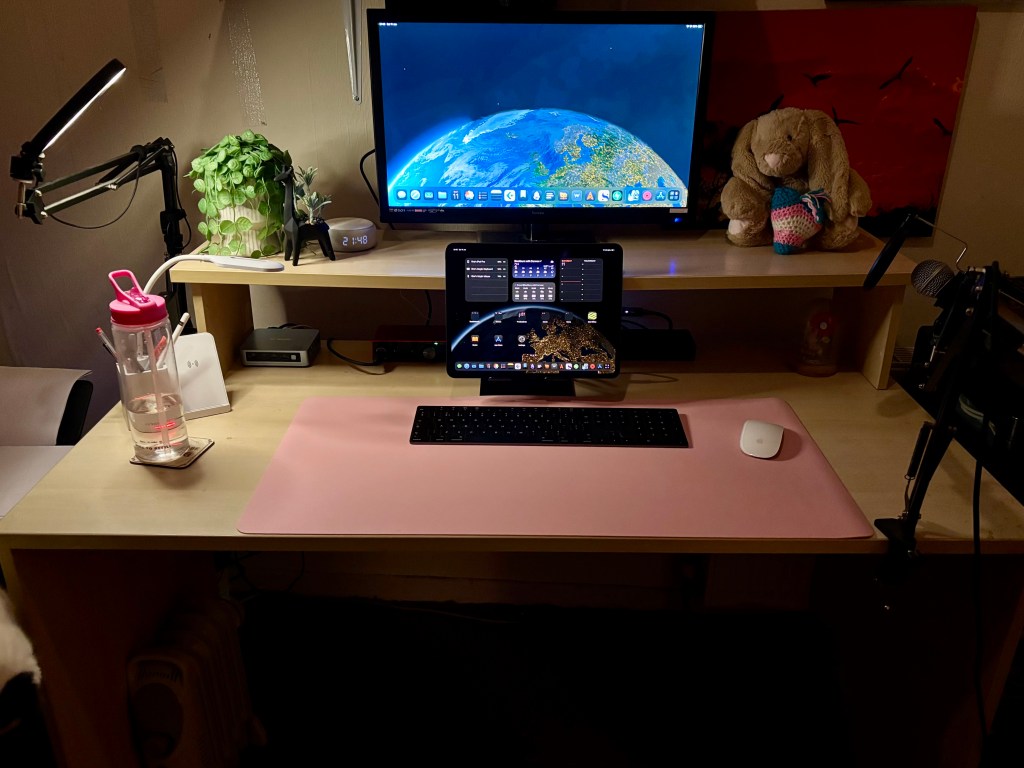
In a nutshell, this tablet is the most powerful computer I’ve ever owned.
Everything I do on it is incredibly smooth. The Affinity Suite, iA Writer, iWriter Pro, Scrivener, Procreate, Day One, Safari, Cubasis 3, and even managing my blog all open instantly and run exceptionally fast.
Although it’s not a Mac, it still runs iPadOS, not macOS. For general administrative tasks, blogging, note-taking, and recording my radio shows, it’s an excellent, portable, and long-lasting machine.
I’ve connected my iPad to an external monitor via a Thunderbolt 3 dock. This setup enables me to use the iPad’s screen as a secondary monitor while the external monitor serves as my primary display. Additionally, it allows me to connect external USB or Thunderbolt devices, external speakers (although the iPad’s speakers are excellent), and Ethernet. The iPad Pro employs Face ID for security.
However, I’ve had to change the way I perform certain tasks. For example, I previously used Audacity for recording the radio show, but it’s not available on the iPad. Consequently, I now use Cubasis 3, which is a bit of an overkill but still sufficient for my needs, potentially even surpassing Audacity.
I’m aware of a few YouTubers, notably the 9to5 Mac YouTube Channel, who exclusively use the iPad Pro for video editing. They accomplish this by utilizing LumaFusion on the iPad, while external SSDs are employed for storing the edited videos due to the iPad’s Thunderbolt 4 port. Additionally, Apple has introduced several of its “Pro” applications to iPadOS, including Final Cut and Logic Pro, although these are undoubtedly expensive. Notably, DaVinci Resolve and Luma Fusion, the original professional-level video editing software, are also available on the iPad. Furthermore, iMovie, which is free with all iPads, including the iPad Pro, is also included..
For photographers, the iPad OS supports the full Affinity Suite of apps, as mentioned earlier. These aren’t reduced versions of the apps available on Mac and Windows but the complete versions. Serif, the company behind the Affinity Apps, has a universal license for them, so you only need to purchase them once for all platforms. Adobe also offers Photoshop and Lightroom. Apple recently acquired the excellent photo editor called Pixelmator. Although they discontinued the original version, they’ve released Pixelmator Pro for iPad and Mac. Additionally, the display on the iPad Pro is highly color-accurate.
Artists are also well-supported with software like Procreate, an iPad-exclusive and one of the best drawing apps available on any platform. Sketchbook, ibis Paint X, and Adobe Fresco are also popular options. The iPad Pro supports Apple’s Pencil Pro and Pencil USB-C, but not the Lightning version of the Apple Pencil that I have for my iPad 10th Gen.
For office work, you can opt for Office 365, the Google suite, or Apple’s iWork Suite, which is free with every iPad, iPhone, and Mac. Personally, I prefer Apple’s iWork suite because it’s sufficient for most home users. Additionally, there are numerous Markdown apps available, such as iWriter Pro, Obsidian, Bear Notes, iA Writer, and more. There are also specialized writing apps for novelists, like Scrivener and Ulysses. For all office work needs, especially for writers and bloggers, I consider the iPad Pro to be one of the best computers available. Apple offers a keyboard case for the iPad Pro, which has received positive reviews on YouTube. However, it’s quite expensive. Since I don’t require a keyboard case and have a third-party keyboard case from ESR for my iPad 10th Gen, which I use when I’m out and about, I don’t need the Apple case. There are many third-party options available, and the ESR case for my iPad 10th Gen is excellent. ESR also offers iPad Pro cases.
For gamers, while the M4 chip is plenty powerful enough to play modern games, the developers have not really developed many games that can take full advantage of the power of the M4. You have all the games you can get on iPhone, so things like COD Mobile, Wuthering Waves, Genshin Impact, Vega Conflict, Vampire Survivors, etc.; and can connect a game controller to it, I wouldn’t call it a gaming powerhouse. The hardware is there, but the games are not there.
The M4 chip is an impressive System on a Chip (SOC). I conducted a benchmark using Affinity Photo’s Benchmark Version 25000 on both an iPad Pro and on my office PC, a Beelink SER 5 equipped with a Ryzen 5 5560 APU (6 Core/12 Thread) that’s based on the Zen3 Architecture and 16GB of dual-channel DDR4 3200MHz RAM. The iPad Pro M4 (Combined, Multi CPU – 1037) outperformed the Ryzen 5560 (Combined, Multi CPU – 412) in the benchmark by more than twice. The GPU performance gap was even more significant. Additionally, if you opt for an iPad Pro M4 with storage 1TB or more, it offers slightly enhanced performance compared to models with less than 1TB of storage, and you also get double the amount of RAM (16GB vs 8GB).
The App ecosystem is progressing quite well, except for the gaming sector. The only feature I genuinely dislike but can tolerate is Stage Manager. This is the multitasking mode employed by the iPad. The iPad’s display offers three modes: the standard iPad mode, where a single app occupies the entire screen; the split view mode, which allows you to run two apps simultaneously, with a third app floating in a small window; and Stage Manager mode. Notably, the external display supports only Stage Manager.
This is where the limitations of iPad OS come into play, but it’s understandable given its iOS base. Stage Manager can only have four apps open simultaneously on the screen, and four stages per app. In theory, you can have up to sixteen apps open at once. However, the way you control these apps is limited in certain places, such as when you click full screen. Unless the app was designed with Stage Manager in mind, it won’t go full screen. Instead, it maximizes the app with gaps around the edges and the dock at the bottom. On the other hand, apps designed with Stage Manager in mind go full screen. However, if you want to switch back to a window, you can’t simply click the same button; you have to drag the bottom right corner to restore the app to a window.
The iPad screen can continue to function normally, switch to split mode, or enter Stage Manager mode. In Stage Manager mode, you can drag apps from the iPad screen to the external monitor and vice versa. However, if you’re using the iPad screen in its default mode, you won’t be able to drag and drop between screens. Instead, you’ll need to use the three buttons at the top of the window to send an app to the external monitor and the reverse to send an app from the external display to the iPad screen.
While the dock moves to the external monitor, the icons on the desktop remain on the iPad screen. Therefore, if an app isn’t in the dock, you’ll need to use Spotlight to launch it.
While there are some limitations to using an iPad as your primary office computer, these can be easily overcome for most people. Is it workable? In short, yes. You get a very fast machine; the M4 chip in the iPad Pro is the fastest chip in the tablet market and one of the fastest chips for consumers today, as evidenced by benchmarks.
Apple Intelligence is another feature you get with the iPad. While I’m not a fan of the general implementations of AI, Apple’s introduction is excellent. You can simply ignore it if you don’t want it (there’s an option to turn it off completely). When it’s on, it’s out of the way unless you want to use it. The AI tools it brings to the table, particularly the writing tools and improvements to Siri, are generally useful. However, some features like the AI Alerts and image playground are, to me, a waste of space, but you can ignore them or turn them off. Overall, I think it’s one of the best implementations of AI I’ve seen.
If you keep the iPad docked all the time, you can set the battery to only charge to 80% to save battery life, just like you can with modern iPhones.
The device itself is lightweight, has an excellent, bright, and color-accurate display, is very fast, has good speakers, and so far, the battery life is brilliant.
Conclusion
The iPad Pro is an excellent tablet computer. It has become my primary office computing device, complementing my phone and iPad 10th Gen, which serves as my laptop as I already have a keyboard case and the Lightning Apple Pencil for it.
All my tasks are executed swiftly, applications launch almost instantaneously, and exporting my radio show is remarkably fast.
The quality of apps available on the iPad is generally higher quality and more affordable. For instance, Cubasis, a crucial app for my weekly radio show, costs £80 on the Mac/PC but only £20 on the iPad (from Cubasis LE 3 to Cubasis 3).
I also like the fact that the iPadOS is more a single app type of OS instead of a multi-tasking OS like Windows and MacOS. This means I get more work done without distractions or constant notifications.
For me, this is a long-term investment. I want this tablet to last for 4-5 years. I am confident that it will, and in fact, it wouldn’t surprise me if it lasts even longer. So, yes, it’s expensive, but you get what you pay for. In the long run, it works out cheaper than constantly buying a new tablet every 2-3 years, which was my habit when I was getting decent Android tablets.
The iPad Pro will receive long-term support due to its powerful M4 chip. Even the M1 chip continues to benefit from the latest iPad OS features.
Additionally, the iPad Pro consumes significantly less electricity compared to traditional Macs or PCs.


Leave a comment