I recently installed CachyOS on my gaming laptop as I was having problems with my Linux Mint distro I had installed previously.
Hardware
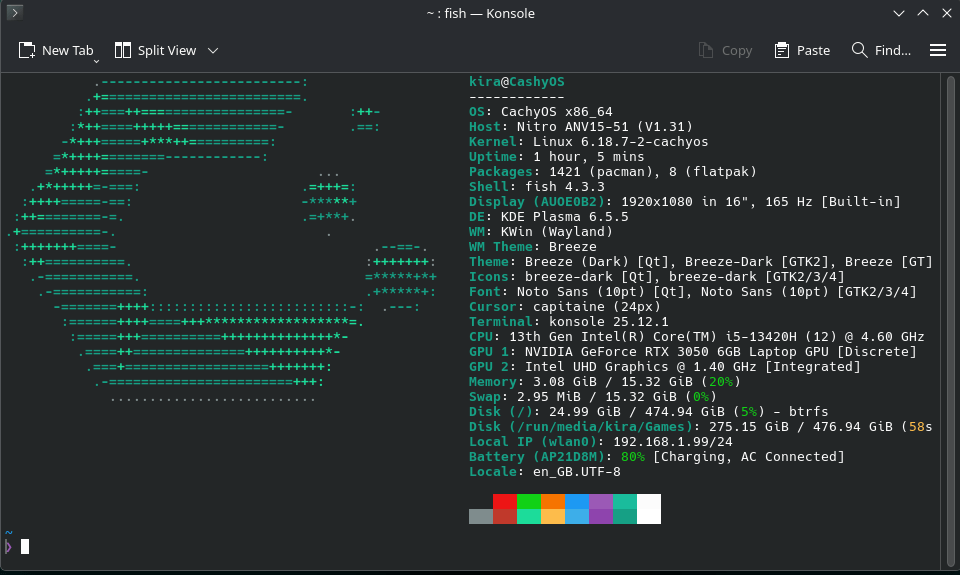
The hardware that my gaming laptop, which is an Acer Nitro ANV15-51, has is as follows: –
- Intel Core i5-1342H 8 Core 12 Thread CPU @4.6Ghz
- 16Gb DDR5 5600Mhz Ram (2x8Gb)
- Intel UHD Graphic
- Nvidia GeForce RTX 3050 Laptop GPU with 6Gb GDDR6 VRAM
- 2 x 512Gb NVME SSD
So as you can see, it’s not exactly a top-end laptop, but it plays the games I want to play with no problems under Windows 11.
You also might note that it has an Nvidia graphics card in the laptop, which is known to be problematic when it comes to Linux. Everyone says the best GPU for Linux is an AMD one, not Nvidia.
The problem with Linux Mint
While I love Linux Mint, I still have it installed on an Office PC. The performance and bugs when it comes to gaming, specifically World of Warships via Steam, are an issue. When I am playing it, the frame rate is lucky if it gets to 60fps on medium settings with FSR enabled, and there is a big where you have to keep the left shift key pressed down for a few seconds to aim your guns.
This was while the power profile was on performance. It felt like the game was running on the iGPU, not the Nvidia GPU, even though the system was configured to use the Nvidia GPU only.
Why CachyOS?
After some research, there were two distributions that stood out to me as good for gamers: CachyOS and Bazzite.
Bazzite is based on Fedora and is trying to copy SteamOS but for everyone, not just for people who have a Steam Deck. Unfortunately, I have read it has problems with dual GPU configurations, especially when one of them is a GeForce card. I am also personally not a fan of Fedora.
Even though CachyOS is not aimed at gamers in particular, it is aimed at performance. It’s based on Arch Linux, which is a rolling release distribution that is always on the bleeding edge. It has a custom kernel, so the CPU scheduler is better than average, hence more performance in general.
You also get the latest drivers for things like the Nvidia GPU, wireless cards, and Bluetooth devices. (At the time of writing, the Nvidia driver version installed on my laptop is 590.48.01; you can check by going into a terminal and typing nvidia-smi.)
While Arch Linux is generally considered hard to install and maintain, CachyOS is very easy to install. It took me 10 minutes, and it is easy to maintain once everything is set up.
An example is installing Steam. When you finish installing CachyOS, you get presented with a program called CachyOS Hello. From here, you can do things like update the system, install apps, etc., but there is also an option to install gaming packages. This will automatically install Steam, Heroic Games Launcher, Proton Tricks, Win Tricks, Lutris, and all the dependencies they require with just a click of a button.
To update the system, you can either use the CachyOS Hello program or just open a terminal and type update. There is also an option in CachyOS Hello to install a system try icon to automatically check for updates for everything, including Flatpak and the AUR (Arch User Repository) and any kernel updates.
There have also been reports of Bluetooth and wireless drivers being a bit temperamental on Linux. I have never had any problems in both Linux Mint and CachyOS with both my Bluetooth Mouse or the Wireless Connection on this laptop. I mainly use it as wireless.
How is the performance in Gaming?
After setting up Steam and downloading the games, I tried World of Warships again. The game defaulted to maximum settings with no FSR. It now runs at 80-90fps with no problems with the power profile on performance. The aiming bug is also fixed. I would say the game plays just as well on CachyOS as it does on Windows 10, and a bit better than Windows 11.
Conclusion
Overall, I am very happy with the performance of CachyOS.
I have installed other programs like the Nextcloud client so I can access files on my server easily, Typora for making blog posts (I am currently typing this on the laptop via Typora) when I am not using my Mac (I generally usually use Macs for anything that’s not gaming), and a web app maker so I can easily access Day One (Diary), WhatsApp Web, and iCloud Mail. My office suite of choice, Collabora Office (It’s based on LibreOffice but with a better interface, works well with Nextcloud), is installed via Flatpak and runs really well also.


Leave a comment